微信小程序 音频和背景音频的无缝切换播放

音频播放

微信小程序目前建议要使用音频的功能,推荐使用通过wx.createInnerAudioContext()创建内部 audio 上下文 InnerAudioContext 对象。

1
2
3
4
5
6
7
8
9
10
11
12
13
14
15
16
17
18
19
20
21
22
23
24
25
26
<!--seek:跳转的位置,auto: 是否自动播放-->
handleAudio(seek=0,auto=true){
const that=this
this.setData({
innerAudioContext: wx.createInnerAudioContext()
})
this.data.innerAudioContext.seek(seek)
<!--这里的url指的是音频的地址-->
this.data.innerAudioContext.src = url
if(auto){
this.data.innerAudioContext.autoplay = true
}
this.data.innerAudioContext.onPlay(() => {
console.log('开始播放')
})
this.data.innerAudioContext.onTimeUpdate(()=>{
<!--持续更新已播放的进度-->
that.setData({
currentTime: that.formatTime(that.data.innerAudioContext.currentTime)
})
})
this.data.innerAudioContext.onError((res) => {
console.log(res.errMsg)
console.log(res.errCode)
})
}

接着在页面生命周期onReady里使用wx.request的success里去调用handleAudio函数。

背景音频播放

如果用户离开音频播放页面,如何是音频接着播放,这里就是用到了背景音频。

1
2
3
4
5
6
7
8
9
10
11
12
13
14
15
16
17
playBackground(){
wx.setStorageSync('work_id', this.data.work_id)
if (this.data.innerAudioContext.paused == false) {
<!--销毁音频实例-->
this.data.innerAudioContext.destroy()
const backgroundAudioManager = wx.getBackgroundAudioManager()

<!--this.data.work:从API获取的数据-->
backgroundAudioManager.title = this.data.work.title
backgroundAudioManager.epname = this.data.work.title
backgroundAudioManager.singer = this.data.work.author.name
backgroundAudioManager.startTime = this.data.innerAudioContext.currentTime
backgroundAudioManager.coverImgUrl = this.data.work.author.avatar[0].url
// 设置了 src 之后会自动播放
backgroundAudioManager.src = this.data.work.audio[0].url
}
}

接着在页面生命周期onHide和onUnload里调用playBackground函数。

完整代码

wxml

1
2
3
4
5
6
7
8
9
10
11
12
13
14
15
16
17
18
19
20
21
22
23
24
25
26
27
28
29
30
31
32
33
34
35
36
37
38
39
40
41
42
43
44
45
46
47
48
49
50
51
52
53
54
55
56
57
58
59
    <!--pages/work/index.wxml-->
<view class='container'>
<i-message id="message" />
<!-- <image class='poster' src="{{work.poster[0].url}}" mode='widthFix'></image> -->
<image-loader
style="width:100%"
default-image='/assets/images/def_poster.jpg'
mode='widthFix'
original-image='{{work.poster[0].url}}'
width="100%" />
<view class='active-audio'>
<view class='audio-left'>
<!-- <image src='{{work.author.avatar[0].url}}' mode='widthFix'></image> -->
<image-loader
style="width:100%"
default-image='/assets/images/def_avatar.jpg'
mode='widthFix'
original-image='{{work.author.avatar[0].url}}'
width="100%" />
<view class='play' wx:if="{{!paly_status}}" bindtap='play'>
<text class='play-btn'></text>
</view>
<view class="stop" wx:if="{{paly_status}}" bindtap='stop'>
<text class='stop-left'></text>
<text class='stop-right'></text>
</view>
</view>
<view class='audio-right'>
<text class='top'>{{work.title}}</text>
<view class='bottom'>
<text>{{work.author.name}}</text>
<view class='time' wx:if="{{duration!='00:00'}}">
<text>{{currentTime}}/</text>
<text>{{duration}}</text>
</view>
</view>
</view>
</view>
<view class='youtube'>
<text>YouTube:</text>
<text class='url'>{{work.video_src}}</text>
</view>
<view class="action">
<view class='action-item' open-type="share">
<button
bindtap="handleTapShareButton"
open-type="share"
class="button-share"
id="share-button">
</button>
<label for="share-button"><i-icon size='24' type="send" />
<text>分享</text></label>
</view>
<view class='action-item' bindtap='handleCollect'>
<i-icon size='24' type="{{collect_status?'collection_fill':'collection'}}" />
<text>{{collect_status?'已收藏':'收藏'}}</text>
</view>
</view>
</view>

wxss

1
2
3
4
5
6
7
8
9
10
11
12
13
14
15
16
17
18
19
20
21
22
23
24
25
26
27
28
29
30
31
32
33
34
35
36
37
38
39
40
41
42
43
44
45
46
47
48
49
50
51
52
53
54
55
56
57
58
59
60
61
62
63
64
65
66
67
68
69
70
71
72
73
74
75
76
77
78
79
80
81
82
83
84
85
86
87
88
89
90
91
92
93
94
95
96
97
98
99
100
101
102
103
104
105
106
107
108
109
110
111
112
113
114
115
116
117
118
119
120
121
122
123
124
125
126
127
128
129
130
131
132
133
134
135
136
137
138
139
140
141
142
143
144
145
146
147
148
149
150
151
152
153
/* pages/work/index.wxss */

.container {
text-align: center;
padding: 0 20rpx;
}

.poster {
width: 100%;
border-radius: 5px;
}

.action {
display: flex;
justify-content: center;
margin: 10px 0;
}

image{
border-radius: 5px;
}
.action-item {
margin: 0 20px;
display: flex;
align-items: center;
}

.action-item label {
display: flex;
align-items: center;
}

.action text {
font-size: 18px;
color: #515151;
}

.button-share {
display: none;
}

.youtube {
margin-top: 20px;
text-align: left;
}

.youtube .url {
word-wrap: break-word;
color: rgb(0, 0, 238);
text-decoration: underline;
margin: 5px;
}

.active-audio {
margin-top: 10px;
width: 100%;
display: flex;
border: 1px solid #e0e0e0;
border-radius: 2px;
}

.audio-left {
position: relative;
width: 80px;
height: 80px;
}

.audio-left image {
border-radius: 0;
}

.play {
position: absolute;
top: 25px;
left: 25px;
border: 1px solid #fff;
display: inline-block;
height: 30px;
width: 30px;
border-radius: 50%;
}

.play-btn {
position: absolute;
top: 7px;
left: 10px;
display: inline-block;
width: 0;
height: 0;
border-top: 8px solid transparent;
border-left: 12px solid rgba(255, 255, 255, 0.9);
border-bottom: 8px solid transparent;
}

.stop {
position: absolute;
top: 25px;
left: 25px;
border: 1px solid #fff;
display: inline-block;
height: 30px;
width: 30px;
border-radius: 50%;
}

.stop-left, .stop-right {
position: absolute;
top: 9px;
display: inline-block;
width: 0;
height: 0;
border-color: rgba(255, 255, 255, 0.9);
border-style: solid;
border-width: 6px 2px;
}

.stop-left {
left: 9px;
}

.stop-right {
right: 9px;
}

.audio-right {
position: relative;
width: calc(100% - 104px);
margin: 0 12px;
text-align: left;
height: 80px;
}
.audio-right .top {
padding-top: 5px;
display: -webkit-box;
overflow: hidden;
text-overflow: ellipsis;
word-break: break-all;
-webkit-box-orient: vertical;
-webkit-line-clamp: 2;
}

.bottom {
width: 100%;
display: flex;
justify-content: space-between;
font-size: 14px;
color: #8b8b8b;
position: absolute;
bottom: 5px;
}
.time{
font-size: 14px;
}

js

1
2
3
4
5
6
7
8
9
10
11
12
13
14
15
16
17
18
19
20
21
22
23
24
25
26
27
28
29
30
31
32
33
34
35
36
37
38
39
40
41
42
43
44
45
46
47
48
49
50
51
52
53
54
55
56
57
58
59
60
61
62
63
64
65
66
67
68
69
70
71
72
73
74
75
76
77
78
79
80
81
82
83
84
85
86
87
88
89
90
91
92
93
94
95
96
97
98
99
100
101
102
103
104
105
106
107
108
109
110
111
112
113
114
115
116
117
118
119
120
121
122
123
124
125
126
127
128
129
130
131
132
133
134
135
136
137
138
139
140
141
142
143
144
145
146
147
148
149
150
151
152
153
154
155
156
157
158
159
160
161
162
163
164
165
166
167
168
169
170
171
172
173
174
175
176
177
178
179
180
181
182
183
184
185
186
187
188
189
190
191
192
193
194
195
196
197
198
199
200
201
202
203
204
205
206
207
208
209
210
211
212
213
214
215
216
217
218
219
220
221
222
223
224
225
226
227
228
229
230
231
232
233
234
235
236
237
238
239
240
241
242
243
244
245
246
247
248
249
const utils = require('../../utils/util.js')
const { $Message } = require('../../utils/iview/base/index');
const app = getApp()
// pages/work/index.js
Page({

/**
* 页面的初始数据
*/
data: {
work:{},
work_id:null,
collect_status: false,
innerAudioContext:null,
time:0,
duration:"00:00",
currentTime:'00:00',
paly_status:false
},

/**
* 根据id获取作品
*/
getWork(id=3,seek=0,auto=true){
utils.wxRequest(`/work/${id}`,{
query: {
qiniu:true
}
})
.then(res => {
this.setData({
work:res.data
});
this.setData({
time: res.data.time,
duration: res.data.formatTime
})
// const audioCtx = wx.createAudioContext('myAudio')
// audioCtx.play()
this.handleAudio(seek,auto)
})
},

/**
* 格式化事件
*/
formatTime(cellValue){
if (cellValue){
let hour = parseInt(cellValue / 3600)
let min = parseInt((cellValue - hour * 3600) / 60)
min = min < 10 ? '0' + min : min
let sec = parseInt(cellValue % 60)
sec = sec < 10 ? '0' + sec : sec
if (hour > 0) {
return hour + ':' + min + ':' + sec
}
return min + ':' + sec
}
},

/**
* 播放音频
*/
handleAudio(seek=0,auto=true){
const that=this
this.setData({
innerAudioContext: wx.createInnerAudioContext()
})
this.data.innerAudioContext.seek(seek)
this.data.innerAudioContext.src = this.data.work.audio[0].url
if(auto){
this.data.innerAudioContext.autoplay = true
}
this.data.innerAudioContext.onPlay(() => {
that.setData({
paly_status:true
})
console.log('开始播放')
})
this.data.innerAudioContext.onTimeUpdate(()=>{
that.setData({
currentTime: that.formatTime(that.data.innerAudioContext.currentTime)
})
})
this.data.innerAudioContext.onError((res) => {
console.log(res.errMsg)
console.log(res.errCode)
})
},

/**
* 播放
*/
play(){
this.data.innerAudioContext.play()
this.setData({
paly_status: true
})
},

/**
* 停止
*/
stop(){
this.data.innerAudioContext.pause()
this.setData({
paly_status: false
})
},

/**
* 获取收藏状态
*/
getCollectByUser(id) {
utils.wxRequest(`/user/collect/${id}`, {
method: 'GET',
header: {
Authorization: 'Bearer ' + app.globalData.token
}
}).then(res => {
if (res.collect == true) {
this.setData({
collect_status: true
})
}
}).catch(err => {
console.log(err)
})
},

/**
* 收藏操作
*/
handleCollect(){
utils.wxRequest('/user/collect', {
method: 'POST',
query: {
work_id: this.data.work.id,
collect: this.data.collect_status
},
header: {
Authorization: 'Bearer ' + app.globalData.token
}
}).then(res => {
this.setData({
collect_status: !this.data.collect_status
})
$Message({
content: res.message,
duration: 1,
type: 'success'
});
}).catch(err => {
console.log(err)
})
},

/**
* 后台播放
*/
playBackground(){
wx.setStorageSync('work_id', this.data.work_id)
if (this.data.innerAudioContext.paused == false) {
this.data.innerAudioContext.destroy()
const backgroundAudioManager = wx.getBackgroundAudioManager()

backgroundAudioManager.title = this.data.work.title
backgroundAudioManager.epname = this.data.work.title
backgroundAudioManager.singer = this.data.work.author.name
backgroundAudioManager.startTime = this.data.innerAudioContext.currentTime
backgroundAudioManager.coverImgUrl = this.data.work.author.avatar[0].url
// 设置了 src 之后会自动播放
backgroundAudioManager.src = this.data.work.audio[0].url
}
},

/**
* 生命周期函数--监听页面加载
*/
onLoad: function (options) {
this.setData({
work_id: options.id
})
},

/**
* 生命周期函数--监听页面初次渲染完成
*/
onReady: function () {
this.getCollectByUser(this.data.work_id)
},

/**
* 生命周期函数--监听页面显示
* 根据storge判断work_id是否相同,再根据后台播放状态判断
*/
onShow: function () {
const work_id = wx.getStorageSync('work_id')||null
if(work_id!=null && work_id==this.data.work_id){
const backgroundAudioManager = wx.getBackgroundAudioManager()
if (backgroundAudioManager.paused==false){
backgroundAudioManager.pause()
this.getWork(this.data.work_id, backgroundAudioManager.currentTime)
}else{
this.getWork(this.data.work_id)
}
}else{
wx.pauseBackgroundAudio()
this.getWork(this.data.work_id)
}
},

/**
* 生命周期函数--监听页面隐藏
* 根据audio播放状态去启动后台播放
*/
onHide: function () {
this.playBackground()
},

/**
* 根据audio播放状态去启动后台播放
* 生命周期函数--监听页面卸载
*/
onUnload: function () {
this.playBackground()
},

/**
* 页面相关事件处理函数--监听用户下拉动作
*/
onPullDownRefresh: function () {

},

/**
* 页面上拉触底事件的处理函数
*/
onReachBottom: function () {

},

/**
* 用户点击右上角分享
*/
onShareAppMessage: function () {

}
})

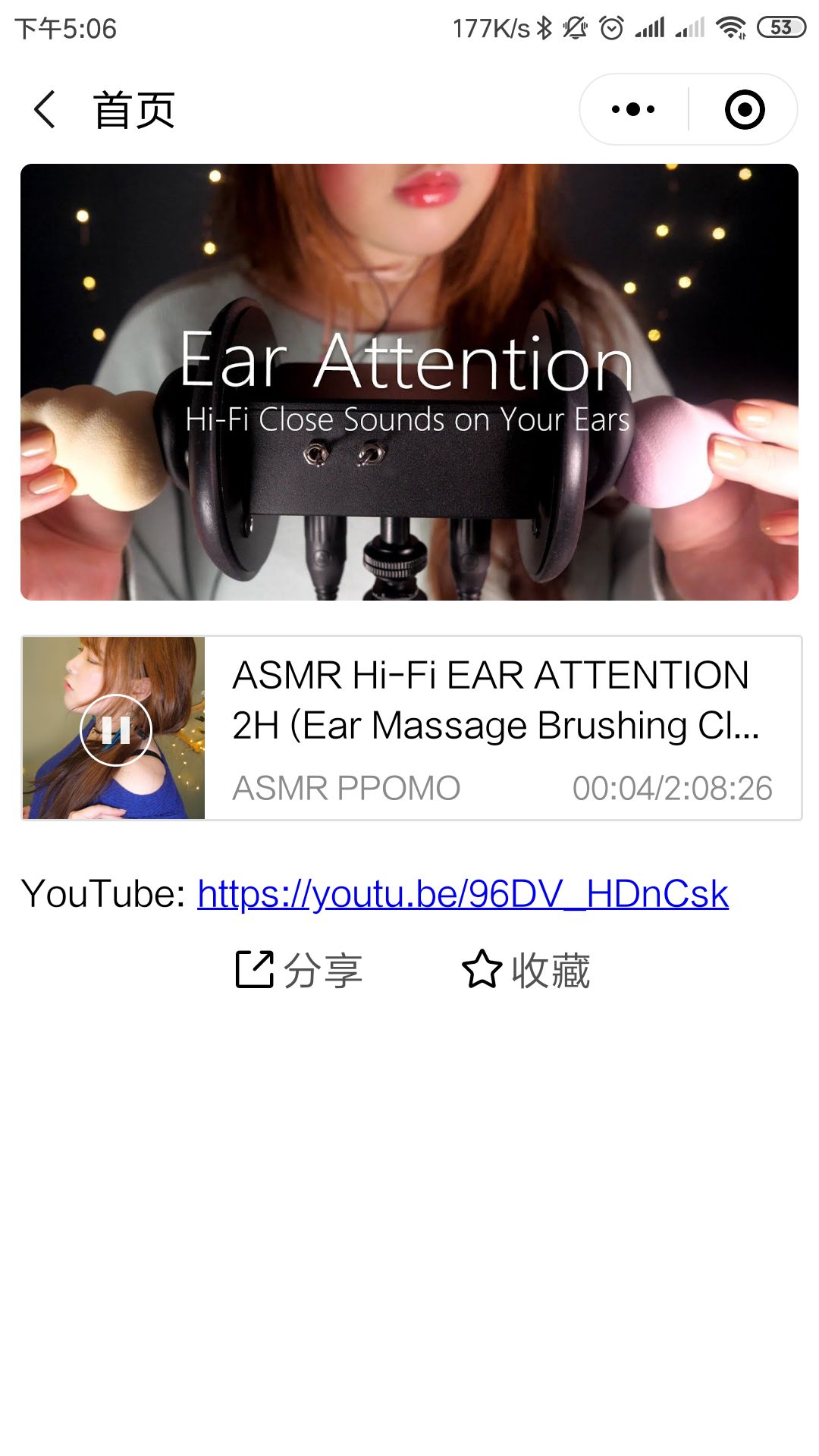
实际效果

参考资料

  1. 微信小程序
  2. ECMAScript 6 入门